Quiet Please
Too much music in your modpack? Turn any song down or off, one by one.
Try it
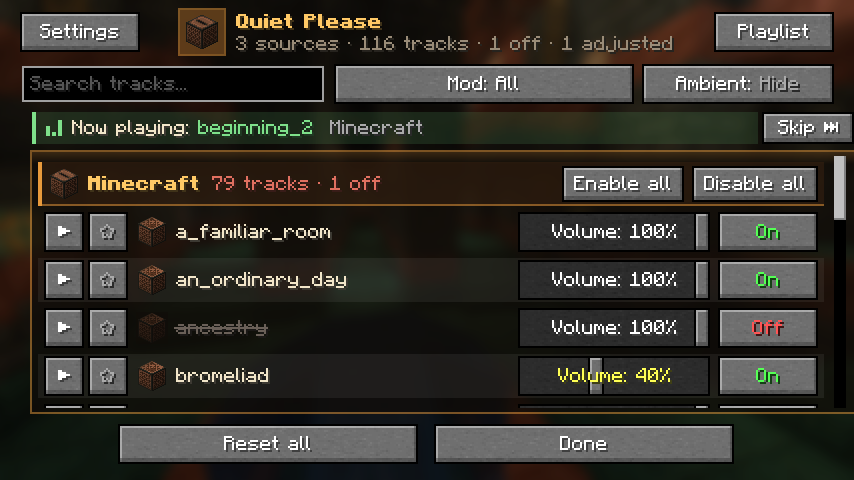
The playing song keeps its place with a green bar. It leaves the queue after it plays and the next one starts. Turn on its loop button to keep it where it is.
Less waiting between songs
When a song ends, Minecraft stays quiet for 5 to 20 minutes before the next one. Pick a shorter wait.
Screenshots
Real screenshots from the game.
Versions
Version 1.3.0, client side only.
Click a loader to open its download page on CurseForge. The Fabric files need Fabric API and also run on Quilt.
Install in a minute
Quiet Please is a single jar file. It only goes on your own game.
- 1
Get a mod loader
Fabric, Forge or NeoForge, for the Minecraft version you play. Fabric also needs Fabric API.
- 2
Download the right file
Pick the file for your Minecraft version and loader on CurseForge.
- 3
Drop it in the mods folder
Put the jar in the mods folder of your game or modpack, then start Minecraft.
- 4
Open the panel
Press Esc and click Quiet Please in the top right corner.
Other ways to open it
- Options and Options, Music & Sounds: the same button, top right
- Mods, Quiet Please, Config (on Fabric this needs Mod Menu)
- A key you choose under Options, Controls, Key Binds, Quiet Please. It starts unbound. The same list has keys to skip a song, favorite the song that is playing and turn playlist mode on or off.
/quietplease guiin chat
Questions
Do servers need it?
No. It is client side only. Install it on your own game and join any server.
Does it work with modded music?
Yes. It lists vanilla music, music discs and music from other mods, for example the boss themes of L_Ender's Cataclysm and Mowzie's Mobs.
What happens when I switch a song off?
The game simply picks another song instead.
Does a song stay in the playlist after it plays?
No, it leaves the queue when it ends and the song after it starts. Turn on its loop button to keep it in its place. When the queue reaches the end it starts again from the top.
Does the playlist stop boss music?
No. Dragon, credits and boss music still play. The playlist only takes over the normal background music.
Why do I hear a preview with Music at 0%?
Previews play on the master channel, so you can check a song even when your music slider is all the way down.
Where are my settings saved?
In config/quietplease.json. Modpack makers can ship a ready file, and /quietplease export and import save and load presets.
Which languages are there?
English, Turkish, German, Spanish, Russian, Brazilian Portuguese and Simplified Chinese. Other languages show the English text.
Can I skip a song with a key?
Yes. Open the panel, Skip the current song, Favorite the current song and Toggle playlist mode all have key binds. They start unbound, so pick your own keys.
Can the music get quieter by itself?
Yes. In Settings, Music behavior, it can turn down or mute while a jukebox plays nearby, while the game is in the background or during a fight. Songs can also fade in and out.
Can I turn off the song popup?
Yes. Song popup in Settings turns it off. Popup settings changes its place, size, colors and text, and you can drag the example card where you want it.
Chat commands
Everything in the panel also works from chat. The commands run on your own game only.
| Command | What it does |
|---|---|
/quietplease | Music count for each mod. Click a mod name to list its songs. |
/quietplease list <mod> | The songs of one mod, with buttons to change them. |
/quietplease volume <track> <0-100> | Set the volume of one track. |
/quietplease off <track>, on <track> | Switch one track off or on. |
/quietplease mod <mod> off, on | Switch every track of a mod off or on. |
/quietplease mod <mod> volume <0-100> | Set the volume of every track of a mod at once. |
/quietplease reset <track>, resetall | Set one track, or everything, back to default. |
/quietplease gui, settings, playlist | Open the panel, the settings screen or the playlist. |
/quietplease skip | Skip the background song that is playing. |
/quietplease export <name>, import <name> | Save or load all your settings, playlist included, as a preset. |
/quietplease dump | Write the full track list to quietplease-tracks.txt. |
What's new
Song popup and music behavior
- Song popup: a small card shows the song and its mod when a new song starts
- Popup settings: position, size, how long it stays, colors, text style, shadow, background, icon, mod name and equalizer. Drag the example card to put it where you want
- Music behavior: turn the music down or off near a playing jukebox, while the game is in the background or in a fight. Fade songs in and out, skip the last songs played and pick favorites more often
- Fade on skip: Skip turns the song down smoothly, a second press stops it at once
- A volume slider for each mod in the panel, and
/quietplease mod <mod> volume - New keys: favorite the song that is playing and turn playlist mode on or off
- German, Spanish, Russian, Brazilian Portuguese and Simplified Chinese
Playlist fixes
- The playing song keeps its place in the queue, marked with a green bar. The song under the mouse gets the orange bar
- Play now no longer moves a song to the top. When it ends, the queue goes on with the next song and starts again from the top at the end
- A looped song stays where it is instead of moving to the end
- The queue remembers where it was and goes on from there after a restart
- The song name next to the Quiet Please button is larger and easier to read
- Minecraft 26.3: right click on the mod filter goes back to the previous mod again, and clicking the now playing bar works
Queue, loop and favorites
- A song leaves the playlist queue after it plays, and the next one starts
- Loop button on every song in the queue: a looped song moves to the end instead of leaving
- The Repeat setting is gone, the loop button takes its place
- Suggested songs next to the queue: your favorites, songs you added before and popular Minecraft songs
- The star marks a favorite and adds the song to the queue. Favorites have their own group at the top of the panel, hidden while there are none
- Shorter track tooltip. Hold Ctrl to see the full details
Playlist and settings
- Background playlist with its own queue: play now, move, remove, shuffle and a progress bar
- Skip button in the panel and
/quietplease skip - Optional key binds to open the panel and skip the current song
- Settings screen: menu buttons, now playing text, ambient default and the music gap
- Presets with
/quietplease exportandimport - Safer settings: an unreadable config is kept as
quietplease.json.brokeninstead of being overwritten
First release
- Volume and on or off for every music track, grouped by mod
- In-game panel with search, mod filter and preview
- Buttons in Options and Music & Sounds, plus
/quietpleasechat commands - English and Turkish